Can You Prove Who Opened a Customer Record, Including an AI Agent? Record-View Auditing, and the Four Things a View Row Never Records
On @objectstack/cli 18.3.0, a person's REST read and an agent's MCP get_record each left one read row in sys_audit_log; a list, an unlisted object and a refused read left none. What a row holds, and the four things it never does.
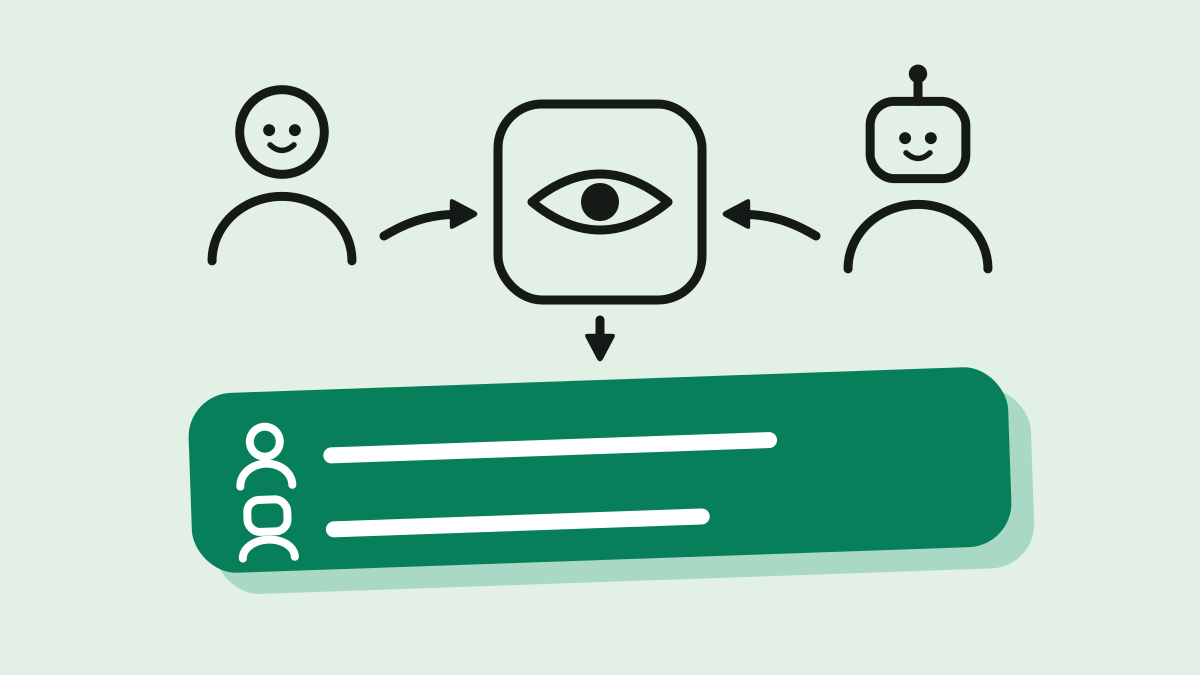
Two rows. That is the whole answer to “who opened Ada Lovelace’s and Linus Torvalds’s contact records this afternoon”, as the ledger of a CRM running on @objectstack/cli 18.3.0 returns it:
created_at | action | user_id | object_name | record_id | old_value | new_value | ip_address |
|---|---|---|---|---|---|---|---|
02:31:27.453Z | read | VPUrZn… (Dana, a sales rep, over REST) | crm_contact | qKPW3T… (Ada) | null | null | null |
02:31:27.490Z | read | HQ6GfW… (an agent’s API key, over MCP) | crm_contact | Aa5lJE… (Linus) | null | null | null |
Five reads produced those two rows. A person opened one contact through the REST API; an AI agent fetched another through MCP get_record with its own API key; the same person then listed all contacts; opened an account (an object the deployment did not opt in); and a user with no position tried to open a contact and got 403. The list, the account and the refusal left nothing. That is the claim this post defends, measured end to end: ObjectStack’s record-view audit records who opened which record and when, for people and agents alike, and it is declared narrowly enough that what it does not record is as legible as what it does. The concept worth keeping is boundaries declared rather than discovered: a compliance feature whose edges are written down beats one whose edges you find during the audit.
The question the permission layer cannot answer
Every permission layer answers who may see this record: object grants, row-level security, field masking. A regulated review opens with the question after that one. ObjectStack’s own documentation on record-view auditing says so in its second sentence: the page “answers the question that comes after it, and that every regulated industry review opens with: who actually opened it, and when?” (content/docs/permissions/record-view-auditing.mdx, lines 8–9 at the 18.3.0 tag).
The EU AI Act piece on this blog argued that an auditor asks for the record of one action, not for a policy document. The permission-boundaries piece was about where the check runs. Neither covered reads. A read is the one action that changes nothing and therefore leaves nothing behind unless something is built to notice it, and on ObjectStack that something is the read action in sys_audit_log, written by @objectstack/plugin-audit from an afterFind hook. The same ledger carries create, update and delete rows from lifecycle hooks and login / logout rows through the services.audit slot; the view rows are the third surface, and the only one that is off by default.
Turning it on is a constructor argument, and nothing else
The audited set is given once, where the plugin is installed. In an app served by the CLI, that place is the stack’s plugins array. The CRM example used below needed two changes: pnpm add @objectstack/plugin-audit@18.3.0, and this in objectstack.config.ts:
import { AuditPlugin } from '@objectstack/plugin-audit';

export default defineStack({
  // …manifest, objects, views, permissions…
  plugins: [
    new AuditPlugin({ readAudit: { objects: ['crm_contact'] } }),
  ],
});
readAudit accepts exactly three keys: objects (the closed per-object opt-in, default empty), maxBatchSize (default 50) and flushIntervalMs (default 2000). An empty list “registers no hook at all”, so a deployment that opts nothing in pays nothing on its read path. AuditPluginOptions declares one other key, getLocale, a host locale resolver for the language activity summaries are written in; it does not change what is audited.
What is deliberately missing matters more than what is there. The documentation states it in bold: “There is no object-metadata key and no environment variable.” enable.auditReads does not exist, no audit: block in the stack config names objects, and requires: ['audit'] makes the plugin a boot requirement but “constructs the plugin with no options and offers nowhere to name objects”. The reason given is the one that makes this a governance post rather than a configuration note: a declarable key “can be set on an object in a deployment that never installs this plugin, producing metadata that reads as audited and records nothing — and on a compliance surface, a declaration a reviewer mistakes for coverage is worse than an absent feature.”
That shape has one visible consequence on the CLI. os serve and os dev auto-register their own option-less AuditPlugin before they walk your plugins, and a later registration under the same name replaces the earlier one. The boot log of the measured run carries the line that proves the opt-in took:
WARN Plugin superseded: 'com.objectstack.audit' — the later registration (v1.0.0)
REPLACED the earlier one (v1.0.0). Only the later instance is initialized and
started; the earlier one is discarded without ever running init().
The documentation is explicit that this line “is the opt-in working, not a misconfiguration”. It is also the one boot-time signal you get: on 18.3.0 the “record-view auditing installed on N object(s)” line is still written at info, below the dev server’s default warn level, so the superseded warning, listed under the banner’s “Boot diagnostics” heading, is what a default boot shows.
Five reads, two rows
The app is examples/app-crm from the ObjectStack repository at the tag @objectstack/cli@18.3.0, with every @objectstack/* dependency pinned to the published 18.3.0 packages and the plugins entry above added. It was started with objectstack dev --compile --no-watch, which compiles the artifact on this boot rather than serving a stale dist/objectstack.json. Three accounts were created through the admin API: Dana, a person holding the sales_rep position; agent-svc, the identity an AI agent’s API key is minted on, also sales_rep; and nobody, with no position at all. The sales_rep position carries crm_contact: { allowRead: true, … } in the example’s permission set, so Dana and the agent may read contacts and nobody may not.
Before the reads, the ledger query returns an empty page:
curl -s -b admin.cookies 'http://localhost:49880/api/v1/data/sys_audit_log?filter={"action":"read"}'{ "object": "sys_audit_log", "records": [], "total": 0, "hasMore": false }Then the five reads, in order.
| # | Who | Read | Answer | Row? |
|---|---|---|---|---|
| A | Dana, signed in | GET /api/v1/data/crm_contact/qKPW3T… | 200, Ada’s record | yes |
| B | the agent, x-api-key: osk_… | MCP tools/call get_record { objectName: "crm_contact", recordId: "Aa5lJE…" } | 200, Linus’s record | yes |
| C | Dana | GET /api/v1/data/crm_contact | 200, three records | no |
| D | Dana | GET /api/v1/data/crm_account/rx99ls… | 200, Acme’s record | no |
| E | nobody | GET /api/v1/data/crm_contact/qKPW3T… | 403 PERMISSION_DENIED | no |
The agent’s call is an ordinary MCP request against the app’s /api/v1/mcp endpoint, authenticated by the key alone:
curl -s -X POST http://localhost:49880/api/v1/mcp -H "x-api-key: $KEY" \
  -H 'content-type: application/json' -H 'accept: application/json, text/event-stream' \
  -d '{"jsonrpc":"2.0","id":3,"method":"tools/call","params":{"name":"get_record",
       "arguments":{"objectName":"crm_contact","recordId":"Aa5lJEWl9nP1Hbuq"}}}'
{ "result": { "content": [ { "type": "text",
"text": "{ \"id\": \"Aa5lJEWl9nP1Hbuq\", …, \"first_name\": \"Linus\", \"last_name\": \"Torvalds\", \"email\": \"linus@globex.example\", … }" } ] },
"jsonrpc": "2.0", "id": 3 }Five seconds later, past the 2 000 ms flush interval, the same ledger query as the admin returns exactly the two rows at the top of this post, "total": 2.
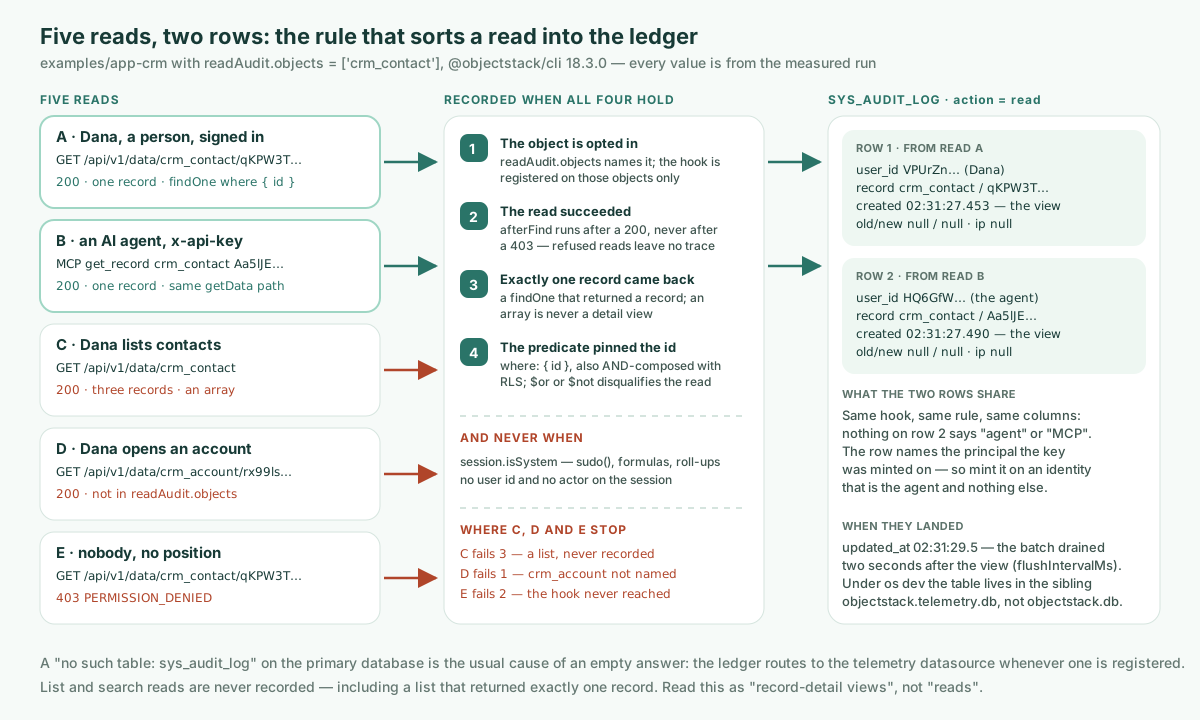
The rule that sorts them is two conditions, both from the documentation and both visible in the measured results. A read is recorded when it “materialized exactly one record” and “its predicate pinned the primary key”. GET /data/:object/:id reaches the engine as findOne(object, { where: { id } }); so does the MCP get_record tool, which on the HTTP transport resolves through the same data protocol and the same getData path as the REST route. Read C fails the first condition (an array is “never a detail view, so find never qualifies”). Read D is not refused by the rule at all; crm_account was simply not in readAudit.objects, and the hook is registered only on the named objects. Read E never reached the hook: the server log for that request says Access denied: operation 'findOne' on object 'crm_contact' is not permitted for positions [org_member, everyone], and “the afterFind hook is reached only by a read that succeeded”.
The card for this post predicted that an agent’s get_record should qualify, as an inference from the predicate rule. It does, on 18.3.0, and the proof is row B.
What a view row records
Reading the measured rows against the documented column table:
| Column | Documented | Measured (row B, the agent) |
|---|---|---|
action | read | read |
created_at | “The instant the record was viewed, not the instant its batch drained” | 02:31:27.490Z; the row’s updated_at is 02:31:29.454Z, the drain two seconds later |
user_id | “The sys_user subject that opened it” | HQ6GfWIx…, the identity the key was minted on |
actor | “The principal label, falling back to user_id” | HQ6GfWIx…, the fallback |
object_name / record_id | the object and record opened | crm_contact / Aa5lJEWl9nP1Hbuq |
tenant_id | “The viewed record’s own organization, falling back to the viewer’s session organization” | org_mw8n…, the contact’s own organization_id |
old_value / new_value | “Always null” | null / null |
Two details in that table carry weight for an auditor. The timestamp is the view, not the write, so a slow ledger cannot shift when something happened. And the tenant stamp follows the record rather than the viewer; the documentation’s reason is that a row about an org-A record stamped with the viewer’s org B “would land behind org B’s tenant wall, invisible to the one tenant administrator the row concerns”. On row B that organization is the contact’s own: the seeded contact carries organization_id: org_mw8n…, the default organization every account in this run joined, so the fallback to the viewer’s session was not exercised. The ledger has no organization_id column of its own: on 18.3.0 sys_audit_log declares systemFields: { tenant: false }, so the platform injects no organization column, and the writer copies the record’s organization into tenant_id alone (packages/plugins/plugin-audit/src/objects/sys-audit-log.object.ts, line 31, and read-audit.ts, line 651, at the tag).
The four things a view row never records
This is the half of the feature a coverage matrix tends to get wrong, and the half the documentation spends a full section on. All four were observed in the measured rows.
- No field values, ever.
old_valueandnew_valuestaynull. The hook “runs inside the security middleware, ahead of its field masking, so the record it sees is pre-mask plaintext”. Copying values in “would mint a plaintext copy of exactly what field-level security withholds, inside the one table compliance staff are granted broad access to”. So the ledger deliberately knows less than the viewer did. - Not what the viewer actually saw. It follows from the first: a row says a record was opened, never which fields were visible after masking. If your control requires “which columns did this person see”, this surface does not answer it.
- No IP address and no user agent. Both columns exist on
sys_audit_logand both arenullon the two rows. They are stamped onloginandlogoutrows, not on view rows. This is also why row A and row B look alike: the ledger records the principal, not the channel. Nothing on the agent’s row says “MCP”, “API key” or “agent”; it saysHQ6GfWIx…, the user the key belongs to. - Nothing about refused or failed reads. Read E is the proof. A denied read “leaves no trace here”; the trace it left is the
WARN [Security] Access deniedline in the server log, which is a different surface with different retention.
Two further boundaries are declared rather than left to be discovered. A system-elevated read writes no row: anything carrying session.isSystem, such as an api.sudo() path, a formula recompute or a roll-up, “is the platform reading for its own bookkeeping”, and since sudo() keeps the caller’s user id, that flag is the only thing separating the two. And a read with no principal writes no row, because “a row naming nobody only adds noise to the one query this capability exists to serve”.
“Including an AI agent” means: as the identity you gave it
Row B answers the question in the title, with a condition attached. The agent’s open landed in the same ledger, through the same hook, under the same two-condition rule as Dana’s, because get_record is a findOne by id under the caller’s principal. There is no agent-specific audit path to configure and none to forget.
The condition is point 3 above. The row names the principal, so what the ledger can prove about an agent is exactly as good as the identity its key was minted on. The MCP connection guide for 18.3.0 puts the choice plainly: “for a full-authority local agent, mint the key on a platform-admin or dedicated service identity; for a scoped one, mint it on a user with exactly the access it should have.” Mint the agent’s key on a person’s account and the ledger will truthfully report that the person opened the record. The measured run minted it on agent-svc, a user that exists only to be the agent, which is why row B is attributable to the agent at all. That is a provisioning decision, not an audit feature, and it is the one decision this post asks you to make.
Where the rows are, and how they fail
Under os dev, sys_audit_log does not live in the application database. Its audit lifecycle class routes it to a dedicated telemetry datasource whenever one is registered, and the dev server “provisions one by default as a sibling SQLite file”. Opening both files of the measured run with the app’s own SQLite driver:
objectstack.db            -> no such table: sys_audit_log
objectstack.telemetry.db  -> [{"action":"config_change","n":2},{"action":"create","n":19},
                              {"action":"login","n":6},{"action":"read","n":2},{"action":"update","n":6}]
The read rows are the two from the table at the top. If an audit query ever comes back empty where you expected rows, this split is the usual cause, and the plugin’s own failure message says so: a “no such table” on a ledger write “usually means the write executed against a DIFFERENT datasource than the one the table was created in”.
The failure posture is the other thing to know before relying on this. The hook “enqueues and returns”; it awaits nothing, and an audit failure never turns a valid read into an error. Rows are persisted on a later tick, when maxBatchSize views are buffered or flushIntervalMs has passed since the batch’s first view, and destroy() drains the tail on a clean shutdown. Neither a buffer overflow (past a fixed ceiling of 10 000 buffered views, oldest dropped, warned once per process) nor a failed ledger write (the batch lost, reported once per cause) is retried. The documentation’s own warning is the sentence to put in your runbook: both failures “are invisible from everywhere else. The reads themselves succeeded and returned 200 … The resulting query returns a confident, wrong, short answer.”
What this does not solve
- List and search reads are never recorded, “including a list read that happened to return exactly one record”. Read C is the measurement. A coverage matrix “should read this as ‘record-detail views’, not ‘reads’”. Exporting a list, running a report and paging through a grid all leave nothing here.
- The viewer’s screen is not in the ledger. Rows prove an open, not what was seen.
- The ledger is only as attributable as your identities. Point 3 again: shared keys and keys minted on personal accounts make the row true and useless at the same time.
- Reading the trail is itself gated. Dana’s own query of
sys_audit_log?filter={"action":"read"}answered403 PERMISSION_DENIED, and so did the same query sent with the agent’s key: thesales_repset grants nothing onsys_audit_log, so the object gate refuses her before any row is judged. A caller whose set does reach the table is served every view row about a record they can themselves read, with a truetotal, unless they hold theview_all_audit_logcapability, which platform administrators hold by default and anyone else only through a permission set. On 18.3.0 a fourth account holding the platform’sorganization_adminset, which readssys_audit_logbut does not carryview_all_audit_log, was served both rows,"total": 2. The rows are retained hot for 90 days and archived for seven years where anarchivedatasource is registered. In the Setup app, Diagnostics › Audit Log, contributed by the plugin, opens the audit browser, which offers the Record Views list (created_at,user_id,record_id,actor) as a preset; on ObjectOS that surface is documented as read-only and immutable.
None of this is unique to ObjectStack as a requirement; any system of record that an agent reads from needs a view trail with edges this explicit. The incident post on this blog made the case for runtime guardrails over prompts on the write side; the read side has the same shape with a smaller blast radius and a longer memory.
Point your agent at it
If an agent writes your app, ask it to add the configured AuditPlugin to plugins for every object that holds customer data, and to refuse any metadata key that claims to do the same thing, because on 18.3.0 there is none. Then review the diff: it is one import and one array entry. If an agent operates your app, mint its key on an identity that is the agent and nothing else, and run the ledger query above on day one, before anyone asks you to.
npm create objectstack@latest my-app && cd my-app
pnpm add @objectstack/plugin-audit
# add new AuditPlugin({ readAudit: { objects: ['…'] } }) to plugins, then
npx os dev --compile
Open one record, wait two seconds, query sys_audit_log for action: read. One row, no values.
To run it, the ObjectStack repository ships ObjectOS Community — the ghcr.io/objectstack-ai/objectstack image, os start and the Console, free and self-hosted — while ObjectOS Cloud is the hosted edition and ObjectOS Enterprise the self-managed, licensed one.